
티스토리 뷰
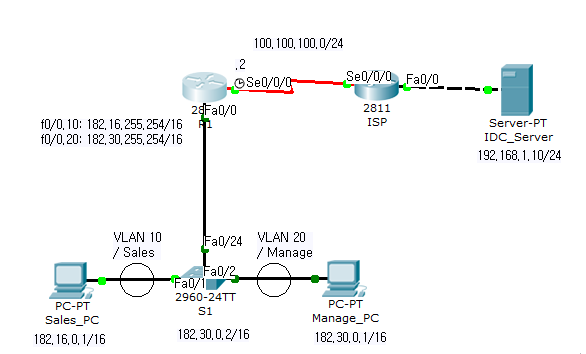

[S1]
en
conf t
vlan 10
name Sales
exit
vlan 20
name Manage
exit
int f0/1
sw mod acc
sw acc vlan 10
exit
int f0/2
sw mod acc
sw acc vlan 20
exit
int f0/24
sw mod trunk
exit
int vlan 20
ip add 182.30.0.2 255.255.0.0
[R1]
en
conf t
int f0/0
no sh
exit
int f0/0.10
enc dot 10
ip add 182.16.255.254 255.255.0.0
exit
int f0/0.20
enc dot 20
ip add 182.30.255.254 255.255.0.0
exit
int s0/0/0
no sh
ip add 100.100.100.2 255.255.255.0
clock rate 56000
cdp enable
exit
cdp run
exit
sh cdp neighbor detail
-------> isp 포트 가 100.100.100.50인거 확인댐 cdp프로토콜에 의해
conf t
ip route 192.168.1.0 255.255.255.0 100.100.100.50
------>시스템설정
banner motd $"## Welcome R1 Router ##"$
username master password admin##
line c 0
motd-banner
login local
exit
enable password admin## -> privillege모드 진입 비밀번호
--------------------------------------------
@@ 콘솔접속시 유저명과 패스워드를 모두 요구하도록 설정.
conf t
username master password admin##
line c 0
login local
exit
@@패스워드만 요구하는 로그인.
line c 0
password admin##
login
--------------------------------------------
@@telnet접속 유저명과 패스워드 요구 설정
conf t
username user01 password admin##
line vty 0 4
login local
exit
--------------------------------------------
-모든 암호 인코딩하기-
conf t
service password-encryption
---------------------------------------------
[Sales_PC]
182.16.0.1
255.255.0.0
182.16.255.254
192.168.1.10
[Manage_PC]
182.30.0.1
255.255.0.0
182.30.255.254
192.168.1.10
'네트워크 > 정보기기운용기능사' 카테고리의 다른 글
| [keduit]정보기기운용기능사 실기연습2 (0) | 2023.03.22 |
|---|