
티스토리 뷰
---------------------------------------------------------------------------
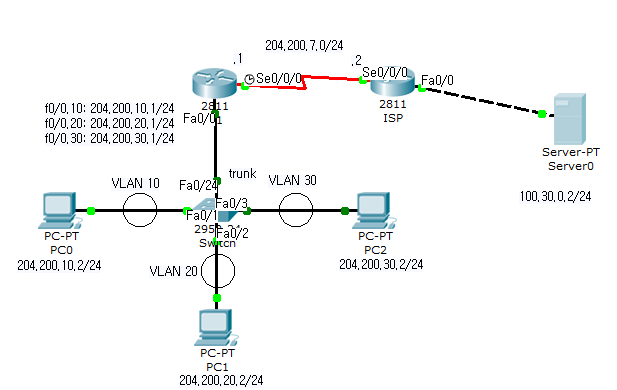

vlan - trunk - ip - routing
[sw]
en
conf t
vlan 10
name skill
exit
vlan 20
name comm
exit
vlan 30
name office
exit
int f0/1
switch mod acc
switch acc vlan 10
exit
int f0/2
switch mod acc
switch acc vlan 20
exit
int f0/3
switch mod acc
switch acc vlan 30
exit
do sh vlan b
int f0/24
switch mod tr
exit
[R1]
en
conf t
int f0/0
no shut
exit
int f0/0.10
enc dot 10
ip add 204.200.10.1 255.255.255.0
exit
int f0/0.20
enc dot 20
ip add 204.200.20.1 255.255.255.0
exit
int f0/0.30
enc dot 30
ip add 204.200.30.1 255.255.255.0
exit
int s0/0/0
no shut
ip add 204.200.7.1 255.255.255.0
clock rate 56000
exit
ip route 100.30.0.0 255.255.255.0 204.200.7.2
설정->
line c 0
password admin##
login
exit
line vty 0 4
password admin##
exit
[ISP]
en
conf t
int s0.0.0
no shut
ip add 204.200.7.2 255.255.255.0
exit
int f0/0
no shut
ip add 100.30.0.1 255.255.255.0
exit
ip route 204.200.10.1 255.255.255.0 204.200.7.1
ip route 204.200.20.1 255.255.255.0 204.200.7.1
ip route 204.200.30.1 255.255.255.0 204.200.7.1
설정->
enable password admin##
[IP Config]

PC0의 경우임.
PC1은 20.2 PC2는 30.2로 IP입력

(서버)
---------------------------------------------------------------------------
'네트워크 > 정보기기운용기능사' 카테고리의 다른 글
| [keduit]정보기기운용기능사 실기연습1 (0) | 2023.03.02 |
|---|